Repair Damaged Media and Documents
Open Video Repair, Image Repair, Document Repair, or Audio Repair when a file exists but will not open or play correctly. Document repair covers categories including PDF and Office files.

Fix common Windows, application, and runtime problems, reclaim disk space, and manage startup programs in one PC maintenance toolkit. Repair damaged files and recover lost data from the same workspace.

GiliSoft Total Repair brings Windows repair, disk cleanup, PC optimization, and file utilities into one application for Windows 10 and Windows 11. Fix common application, DLL, Visual C++, and .NET problems, remove unwanted junk and duplicate files, and find out what is filling your drives.
Manage startup programs, installed software, registry entries, and context menus from the same toolkit. For Windows component problems, open system file, system image, or disk error repair; for a damaged document or media file, use the dedicated file repair tools.
Scan results and component status help you choose the next action. Continue with data recovery when files have been deleted or lost, or compress files and images when storage and sharing size are the main concern.
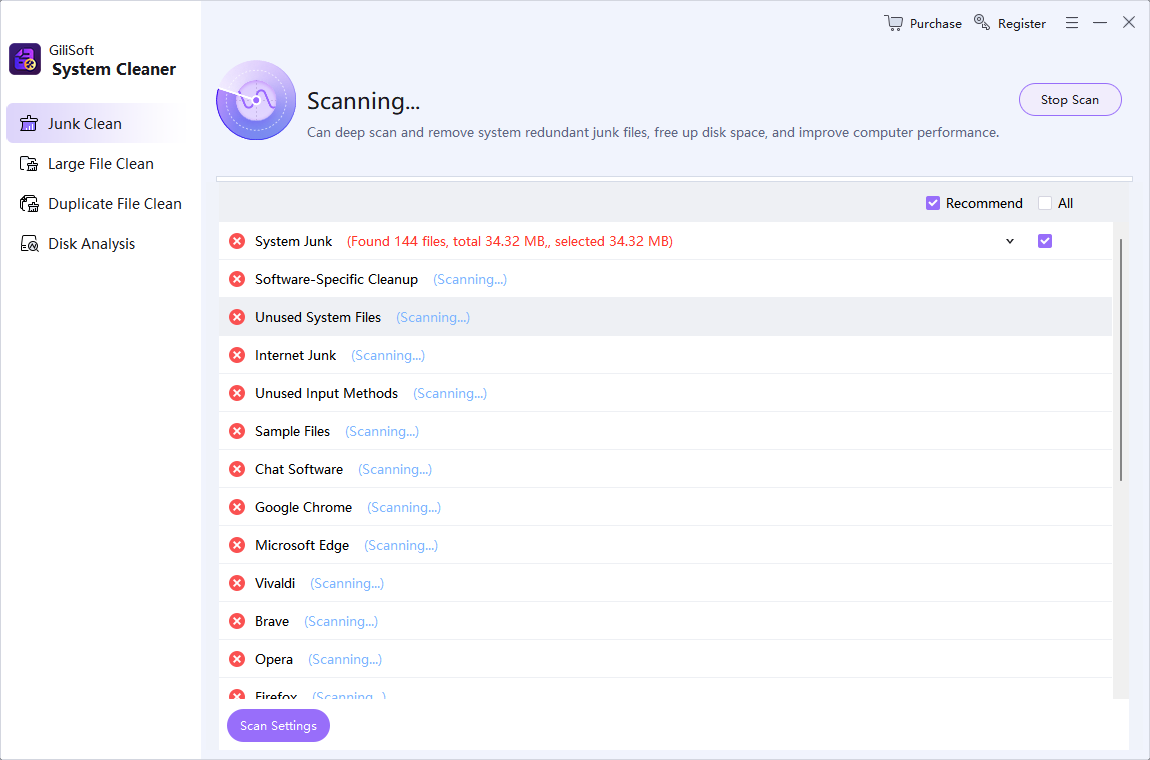
Scan system junk, software leftovers, and browser-related files. Find oversized files and duplicate copies, then use Disk Analysis to understand storage use before deciding what to remove.
Use Memory Opt to review memory cleanup and Software Uninstall to remove programs you no longer need. Keep disk cleanup, installed software, and daily PC maintenance in one workspace.
Investigate programs that will not start or report missing components with Application Error and System DLL Scan. Review the affected components and available repair actions instead of guessing which file is responsible.
Check Microsoft Visual C++ libraries, .NET Runtime, and .NET Framework components used by desktop applications and games. Choose the matching repair category when an error points to a runtime dependency.
Open dedicated tools for Windows system files, system image errors, and disk errors. Keep component repair separate from storage cleanup so you can address the problem Windows is reporting.
Start with One-Click Repair when several symptoms need investigation. For an identified component or error, use Manual Repair or a focused repair tool to work directly on the known issue.
Inspect startup programs, scheduled tasks, and services. Review invalid registry entries, unwanted right-click menu items, and Windows tune-up settings without treating every entry as something to remove.
Use Game Repair for common launch and component problems, or Error Code Scan when Windows reports a specific code. Follow the relevant repair path and test the affected game or program again.
Total Repair helps us review junk files, startup items, and common repair warnings on shared PCs.
The application, runtime, and DLL repair categories make repeated launch problems much easier to investigate.
Disk analysis and duplicate cleanup help us find storage waste before removing anything from older machines.
Different file problems need different tools: repair a damaged file, recover a missing one, or compress working files for storage and sharing.
Open Video Repair, Image Repair, Document Repair, or Audio Repair when a file exists but will not open or play correctly. Document repair covers categories including PDF and Office files.
Use Data Recovery when the original file has been deleted or is no longer visible. Save recovered files to a different drive and verify them before returning to normal use of the source storage.
Package files and folders into 7Z, ZIP, or TAR archives. Keep related documents and project assets together when preparing a smaller archive for storage or transfer.
Batch-compress images or decompress supported archives, including 7Z, RAR, ZIP, TAR, and GZIP. Choose compression for file size, rather than treating it as a repair or recovery operation.
Explore the Windows cleanup, repair, startup management, and file-tool workspaces, with component status and task-specific controls.
Choose the task that matches the symptom, inspect the results, and check the same problem again after applying the repair or cleanup.
Open System Clean for storage clutter, System Repair for Windows or application errors, or PC Optimization for startup and Windows settings.
Inspect the detected categories, file paths, sizes, and component status. Keep important work backed up and select only the items relevant to the problem.
Clean unwanted files, repair the identified component, or change a startup entry. For damaged or deleted files, use the corresponding file tool instead.
Restart Windows when requested, then reopen the affected program or repeat the original task. Check repaired or recovered files separately before replacing originals.
Find storage clutter, review software that starts with Windows, and investigate recurring application errors without collecting a separate utility for each task.
Check DLL, Visual C++, .NET, game, and error-code problems when software fails to launch. Keep the exact error message in view when choosing the repair category.
Use disk analysis, startup management, software removal, and component checks for routine maintenance on work, classroom, and shared PCs.
Move from Windows maintenance to repairing a damaged video or document, recovering missing files, or compressing project assets in the same product.
GiliSoft Total Repair brings Windows repair, PC cleanup, startup management, and file tools together on Windows 10 and Windows 11. Use it to review junk and duplicate files, check application and system components, repair DLL and runtime problems, manage startup entries, and work with damaged or lost files.
Total Repair includes Application Error, System DLL Scan, C++ Runtime Library, .NET Runtime Repair, and .NET FX Repair tools. Choose the category that matches the affected program or error, review the detected items, and apply the relevant repair. Restart if requested and test the program again; a component repair cannot resolve every possible cause of an application failure.
Use One-Click Repair for a broader check when the cause of a Windows or application problem is unclear. Use a specific DLL, runtime, game, or error-code tool when you recognize the problem. Manual Repair provides a direct search-and-repair path for an identified issue instead of running every maintenance tool.
Startup Manager lets you inspect startup programs, scheduled tasks, and services. Review entries you recognize and disable only items you do not need at startup. Software Uninstall, System Tune-Up, and Context Menu tools provide additional ways to manage unwanted software and Windows settings; the effect on startup time depends on the PC and its workload.
Junk Clean scans categories such as system junk, software leftovers, and browser-related files. Duplicate File Clean finds repeated files, while Large File Clean and Disk Analysis help identify storage use. Review the categories, file paths, and sizes before removing items, and keep copies needed by current projects, applications, or backups.
Use Video Repair, Image Repair, Document Repair, or Audio Repair when a file still exists but will not open or play correctly. Use Data Recovery when a file was deleted or lost. Keep original damaged files unchanged, and save recovered data to a different drive so it does not overwrite other data you may still need.
A trial download is available. Full licensing is paid; the $39.95 Buy Now offer shown here is a Lifetime / 1 PC license. The purchase page also lists annual and multi-PC options, so you can choose a license for the number of computers you use.
Save open work, close programs that may be using the affected files, and keep important data backed up separately. Review detected items and choose the cleanup or repair action that matches the problem. Use a system restore point where appropriate, restart when requested, and repeat the original task to check the result.

Editors highlighted storage cleanup, error repair, data recovery, and file utilities for routine Windows maintenance.
Coverage noted junk cleanup, disk analysis, application and runtime repair, startup management, and damaged-file repair in the same product.

Reviewers praised stable scan behavior and easy verification before final actions.
Review notes emphasized system scans, repair checks, and cleanup actions for maintaining Windows PCs.

Independent write-ups noted storage cleanup, registry tools, system repair, startup management, and disk analysis.
Coverage highlighted the combination of storage cleanup, registry maintenance, system repair, startup control, and disk analysis for Windows PCs.
Clean unwanted files, repair Windows and runtime problems, manage startup, and work with damaged or lost files using GiliSoft Total Repair.


Enter your email address to get our latest newsletter