

How to Hide a File on Windows
The Windows Hidden attribute is easy to reveal. File Lock Pro provides a managed hiding workflow for selected files, but hiding still addresses visibility rather than cryptographic confidentiality.
Quick answer
Start File Lock Pro and choose the local hiding workspace. Back up the target first, apply the narrowest useful rule, and test both authorized access and the action that should be blocked.
Choose Hiding, Locking, or Encryption
| Situation | Recommended approach | Check carefully |
|---|---|---|
| Reduce casual visibility on one PC | Hide the selected file | Recent lists, shortcuts, and administrators |
| Require controlled access | Lock the file | Recovery password and application access |
| Protect a portable or transferred copy | Encrypt the file | Recipient compatibility and key handling |
| Prevent editing while allowing reading | Use Protect | Normal save and update operations |
Step-by-Step Workflow
- Back up and close the file
Keep a verified copy outside the hidden location and close applications using the file.
- Open Local Disk and Hiding File
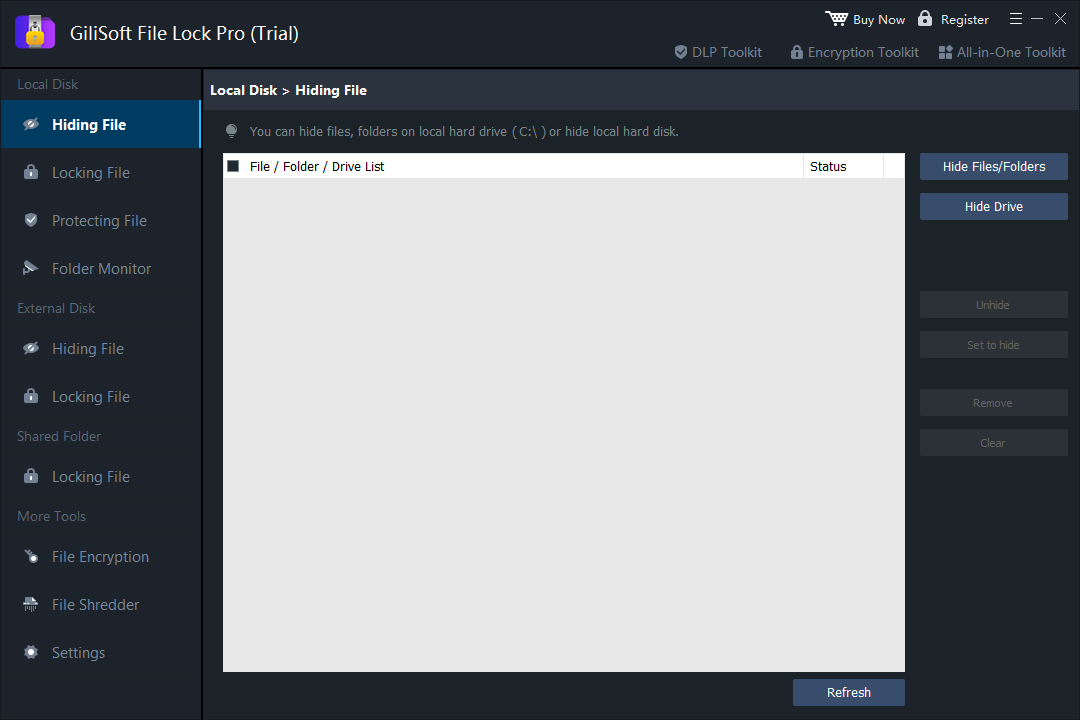
Start File Lock Pro and choose the local hiding workspace.
- Add the exact file
Select Hide Files/Folders, confirm the path, and avoid hiding broad folders when only one file is private.
- Apply hiding and check Windows
Close the product and test File Explorer, Windows search, shortcuts, and the application recent-file list.
- Unhide and verify recovery
Restore visibility with the authorized password and confirm the file remains intact.
See the File Lock Pro user guide for every workspace, password recovery, and related protection task.
GiliSoft File Lock Pro Interface
These product screenshots connect the workflow to the relevant local Windows controls.

Review the Protection Boundary
- Keep a verified backup before applying broad access or write restrictions.
- Use a standard user account to test both the permitted workflow and the blocked action.
- Protect the administration password and document how authorized recovery works.
- Keep Windows Security enabled and use encryption when offline data exposure is in scope.
Frequently Asked Questions
Is the Hidden checkbox secure?
No. The ordinary Windows Hidden attribute can be revealed through Explorer settings.
Will the filename disappear from recent items?
Not necessarily. Application and Windows history are separate from the file-hiding rule.
Can I hide a whole folder instead?
Yes, but choose the exact folder and test every application that uses it.
Can an administrator still recover the file?
Administrative or offline access is a separate risk. Use encryption when confidentiality must survive those paths.