AI Face Detection
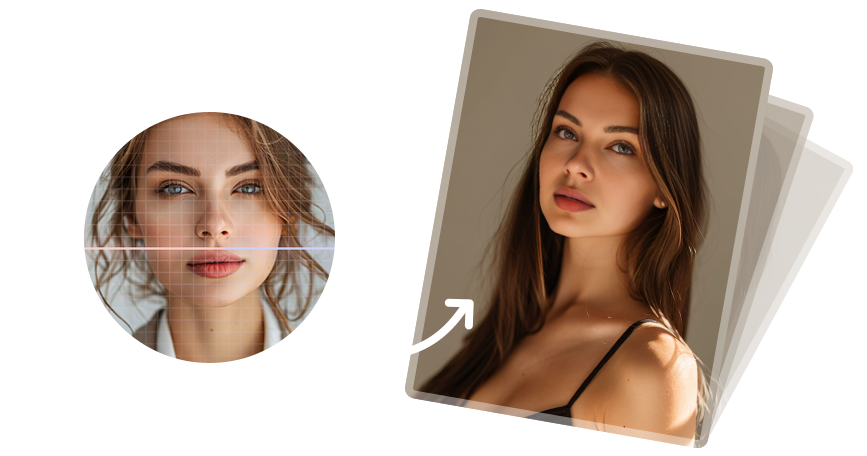
Automatically detects facial landmarks for accurate alignment, helping produce natural and consistent swap results.

GiliSoft Face Swap
AI face swap for photos and videos with cloud and offline workflows

Windows 10/11 (32 bits &64 bits)
GiliSoft Face Swap supports photo face swaps and video face swaps on Windows with two workflows: Cloud Face Swap for flexible online processing and Offline FaceSwap Master for local creation, local data storage, and stronger privacy control.
Use the same installer download to test the workflow that fits your creative, marketing, or demo-production needs.
This makes the page a better fit for users comparing online and offline face swap software instead of a browser-only tool.
Select the workflow that matches your usage and privacy needs.
A flexible online option for creators who need scalable processing and pay only for what they use.
A local desktop solution for stable performance, full control, and predictable one-time licensing.


Automatically detects facial landmarks for accurate alignment, helping produce natural and consistent swap results.
Swap faces in a few steps with an intuitive workflow suitable for both beginners and professional creators.
Create high-quality face swaps for portraits, social posts, and creative design materials from still images.
Apply face replacement to video clips with smooth frame-to-frame consistency for more realistic motion output.
Export clear and visually consistent results suitable for personal content, marketing creatives, and demo materials.
Process multiple assets efficiently to speed up repetitive production and large-volume content tasks.
Run face swap tasks directly on your PC to reduce dependency on network conditions and improve data control.
Use cloud resources when needed for flexible scaling in usage-based scenarios and faster online collaboration.
Choose the workflow that matches your security requirements, from cloud flexibility to offline local data storage.
Optimized processing helps shorten turnaround time so you can iterate quickly and deliver content faster.

GiliSoft Face Swap helped us build playful social creatives faster without losing too much realism in close-up shots.
The offline workflow made it easier to keep preview assets local while still testing multiple face-swap ideas quickly.
One-click swaps were useful for fast campaign mockups and internal concept reviews before final editing.


Use Face Swap for social clips, parody concepts, short-form experiments, and visual storytelling that needs fast AI face replacement.
Create quick test visuals, ad concepts, and demo assets when you need realistic face swaps without a heavy manual compositing workflow.
Choose cloud processing for flexible online jobs or offline mode when local creation and local data storage matter more.
Work with a Windows desktop app instead of relying only on browser tools, online quotas, or always-on cloud processing.
Use one Windows product for still-image swaps and moving video content instead of splitting the workflow across multiple tools.
Choose cloud processing for flexible usage or offline mode for local creation, local data storage, and stronger privacy control.
The workflow is shaped around face swapping instead of making users build the whole process from general-purpose editing features.
Generate quick visual concepts and reusable creative variants when you need speed more than a fully manual VFX pipeline.
Build visual concepts, memes, parody images, and campaign mockups from portraits and still photos.
Generate video variations for demos, social content, campaign tests, and internal creative reviews.
Use offline mode when local processing and local data storage matter more than cloud flexibility.
Offline face swap software | Private face swap software | Local face swap software
Match the workflow to the job by choosing online convenience or local privacy based on each project.
Yes. The product supports face swapping for still photos and video clips on Windows.
Cloud mode is designed for flexible online processing, while Offline FaceSwap Master focuses on local creation, local data storage, and lifetime offline usage.
Yes. It fits creators, marketers, social teams, and demo builders who need fast AI face swaps for photos and videos.
Face swap software for Windows | AI face swap for social media | Best face swap software for Windows
Yes. Offline FaceSwap Master is meant for local processing and local data storage when privacy control matters more than cloud flexibility.
Yes. Both plans use the same installer download so users can start quickly and choose the workflow that fits them best.
Users who want a Windows desktop workflow, stronger local privacy control, and the option to work offline should consider GiliSoft Face Swap.

 Editors noted stable face-tracking across varied lighting and head-angle conditions. Coverage highlighted fast turnaround for social clips, demos, and ad creatives.
Coverage highlighted creator-friendly results for social visuals, short demos, and campaign mockups.

Reviewers praised identity consistency when processing longer sequences frame by frame. Lab notes cited practical controls for swap intensity, blending, and output quality.
Write-ups emphasized more reliable video swaps for creators who need repeatable results across multiple test renders.

Independent write-ups described the workflow as creator-friendly without sacrificing precision. Commentary emphasized predictable exports suitable for repeated campaign production.
The page was noted as a practical Windows option for users comparing cloud convenience with offline privacy control.


Enter your email address to get our latest newsletter