Password-Protect CDs and DVDs
Burn confidential files into a password-protected secure area on a CD or DVD. Recipients need the correct password to open those files, while public content stays available.


GiliSoft Secure Disc Creator protects the files you store and share on CD, DVD and ISO images with AES-256 encryption and password-controlled access. Keep confidential content in a secure area and open instructions or general information in a public area on the same disc.
Protect contracts, financial records, customer documents, photos, videos, software installers, backup archives and project folders. Add files to the appropriate area, set the secure-area password, and burn the disc or save an encrypted ISO image for later use.
Create, mount and test an ISO before burning the final disc. Recipients open the secure area on Windows with the included agent.exe and your password, without installing the full Secure Disc Creator application.
Made for businesses sharing client files, teachers and training teams preparing course materials, service teams distributing technical documentation, and people protecting personal archives. A command-line edition is also available for automation. See the Secure Disc Creator user guide for setup and protected-file access.

Burn confidential files into a password-protected secure area on a CD or DVD. Recipients need the correct password to open those files, while public content stays available.
Keep readme files, catalogs and instructions in the public area. Place private documents and folders in the encrypted secure area, so one disc can serve both needs.
Save your public and secure file layout as an ISO image with a password-protected secure area. Store the image as an archive, review it or burn it to a disc later.
Recipients run the included disc agent on Windows and enter the password to open the secure area. They do not need the full disc-creation application.
Add private documents, spreadsheets, photos, videos, audio, installers and archives to the secure area. Protect related files and complete folders together.
Create protected discs directly or burn a completed ISO image with the built-in burning tools. Prepare the file layout and produce the disc in one application.
Mount an ISO image to review its contents without burning a physical disc. Check the public files and password access to the secure area before sharing it.
Encrypt the contents of the secure area with AES-256 protection. Keep confidential data password-protected rather than storing it as ordinary open files.
Prepare and check an encrypted ISO image before producing physical copies. Burn the completed image when you are ready, without adding the source files again.
A command-line edition is available for teams that need to integrate secure-disc creation into scripts and established media-preparation tasks.

Secure Disc Creator helped us distribute confidential training packs on DVD without exposing source files in transit.
Password-protected disc creation was easy to roll out, and access behavior stayed stable across repeated use.
The secure/public area split gave us a practical way to share public documents while keeping private data protected.
Virtual drive support made it easier for our team to test encrypted ISO content before final disc delivery.
Built-in burning and encrypted ISO workflows reduced handoff errors in our secure media preparation process.
We use command-line automation to generate protected discs for field distribution, and it fits cleanly into our packaging scripts.
Encrypted ISO output helped us prepare archive images first and burn final discs only after review was complete.
The public and secure area design made customer handoff easier because instructions could stay open while private files stayed locked.
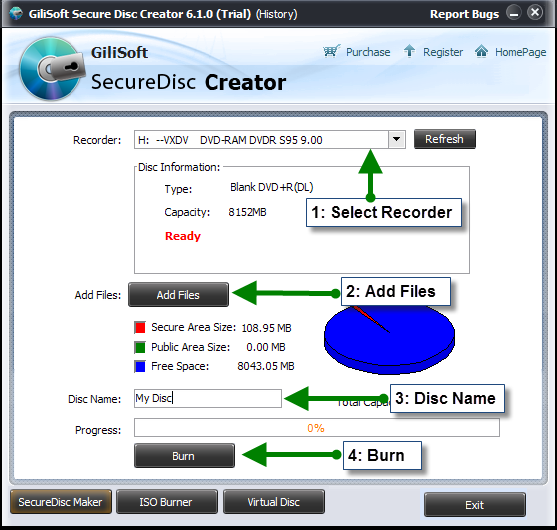
Select the recorder, add files, name the disc and burn public and password-protected content together.
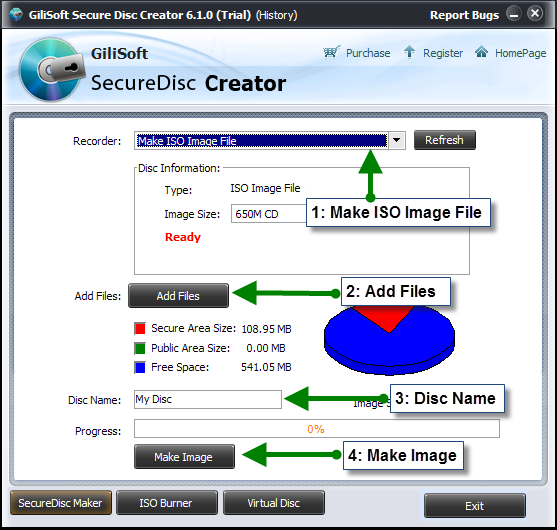
Save the public and secure file layout as an encrypted ISO image for storage or later burning.

Mount an encrypted ISO image to check its public files and secure-area password before burning.
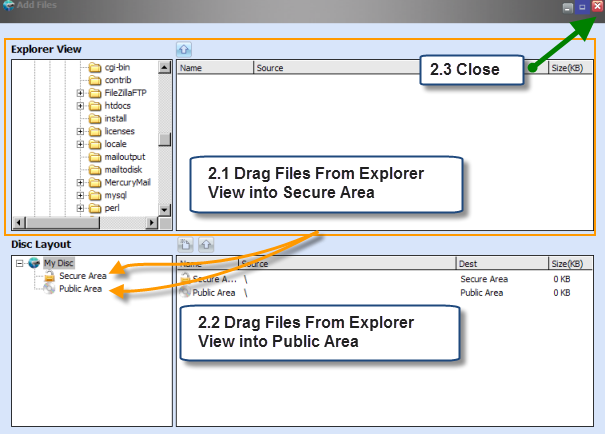
Add public files and protected files into the right disc area before creating final media.
Protect contracts, financial records, reports and confidential project files when preparing a CD, DVD or ISO for customers and partners.
Keep lesson videos, presentations and reference documents in the secure area, with general instructions available in the public area.
Prepare technical drawings, manuals, installers and service records on one disc while keeping confidential project information password-protected.
Keep private photos, videos, documents and family records in an encrypted secure area when saving them to optical media or ISO images.
Create protected media, verify the file layout and password, and prepare discs for colleagues or customers. A command-line edition is available for scripted tasks.
Prepare encrypted ISO archives for completed projects, check them in a virtual drive and burn physical copies when needed.
Keep confidential files encrypted while readme files, catalogs and instructions remain easy to open. Recipients can find what they need on the same disc.
Include the disc agent with your protected files. Recipients open the secure area on Windows with the agent and password, without installing the authoring application.
Create an encrypted ISO and mount it to verify the layout and password access. Burn the checked image when you are ready to make physical copies.
Put course videos, presentations and lesson documents in the secure area, with setup instructions and course information in the public area.
Keep public readme files accessible while customer documents, project files and private records stay encrypted in the secure area.
Save an encrypted ISO image of your file collection. Keep it as an archive or use the completed image to burn a CD or DVD later.
Check that public files open normally and secure-area files require your password before committing the image to physical media.
Add a confidential folder to the secure area, then set the area password before burning. Keep related documents and project materials protected together.
Include installers, manuals, documents and supporting media on one disc. Choose which files belong in the public area and which require the secure-area password.
Yes. Create CDs, DVDs and ISO images with a password-protected secure area. Files in the secure area are encrypted; files placed in the public area remain accessible without a password.
Yes. Put readme files, instructions and general information in the public area, and confidential files in the encrypted secure area. Only the secure area requires the password.
Recipients use Windows to run the included agent.exe from the disc or mounted image, then enter the secure-area password. They do not need to install the full Secure Disc Creator application.
Yes. Burn a completed ISO image to a CD or DVD with the built-in burner, or mount it in the virtual-drive tool to review the file layout and test password access.
Add documents, spreadsheets, photos, videos, audio, software installers, backup archives and project folders. Protection applies to the secure area rather than changing each file into a new document or media format.
Yes. Choose Make ISO Image File, add your public and secure files, set the secure-area password and save the image. Keep it as an encrypted archive, test it in a virtual drive or burn it to CD or DVD later.

 Editors highlighted practical CD/DVD encryption workflows for controlled media distribution. Coverage noted straightforward setup for teams that need immediate confidentiality controls.
GiliSoft Secure Disc Creator is an easy-to-use, intuitive application for the creation of encrypted CDs and DVDs.

Reviewers praised password protection and ISO handling options aligned with compliance-oriented delivery routines. Lab observations mentioned stable lock and unlock behavior under repeated operations.
In addition to encrypting CDs and DVDs, the utility can create encrypted ISO images for later burning or virtual drive mounting.

Independent write-ups described the product as dependable for routine encrypted media creation. Commentary emphasized clear administration and predictable recovery access flows.
A simple tool that provides users with the option to burn encrypted CDs and DVDs, with solid ease of use for protected disc delivery.


Enter your email address to get our latest newsletter