Cut, Trim, Split, and Delete Audio
Select the exact waveform range you need, then cut unwanted parts, trim quiet openings and endings, split a long recording into sections, or delete mistakes from voice and music files.


GiliSoft Audio Editor provides visual waveform controls for music, interviews, podcasts, lectures, meeting recordings, and narration. Select the exact range you need, remove mistakes or silence, split long recordings, reorder clips, or join several sources into one finished file.
Record system sound or microphone input, mix narration with music, apply fades and volume changes, update MP3 tags, and export to a practical audio format. For dedicated batch format conversion, use GiliSoft Audio Converter Ripper; for recording, editing, speech, voice, and CD tools together, use GiliSoft Audio Toolbox.
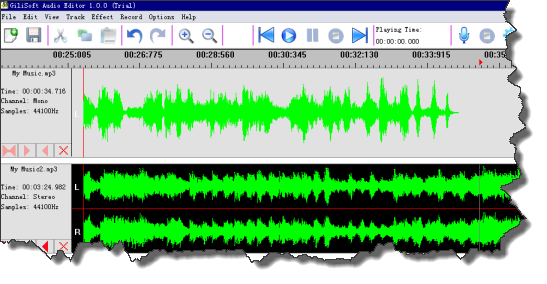

Select the exact waveform range you need, then cut unwanted parts, trim quiet openings and endings, split a long recording into sections, or delete mistakes from voice and music files.
Combine multiple audio clips into one file, paste segments into a new position, mix background music with narration, and prepare cleaner output for podcasts, demos, lessons, and short media projects.
Capture online audio, microphone narration, radio streams, interviews, meetings, lectures, or external sources, then edit the recording immediately in the same tool.
Use fade in, fade out, echo, amplification, volume adjustment, and mixing tools to make voice tracks clearer and exported audio more consistent.
Work with common audio formats such as MP3, WAV, WMA, OGG, M4A, CDA, RA, RAM, TTA, and VOX so finished files are easier to share, archive, upload, or play on other devices.
Pull audio from video files, then organize finished MP3 files by title, artist, album, track number, and other ID3 details before publishing or storing them.
Apply repeated cutting tasks to multiple source files when lessons, recordings, samples, or ringtone clips need the same preparation workflow.
Zoom into the waveform, select exact ranges, preview edits, and use undo or redo before saving the finished audio file.

GiliSoft Audio Editor helped us clean interview recordings faster and keep export quality consistent.
The waveform tools made it easy to remove filler sections and deliver clearer podcast clips.
We record online sessions, trim the result, and prepare MP3 files in one place.
Preview the updated audio workspace: edit waveforms, use audio tools, manage Audio CD tasks, and open text or AI-assisted utilities when the project needs them.

Start from the main workspace and choose the audio task that matches the job: edit, convert, record, handle CD audio, or use related audio utilities.
Remove silence, false starts, repeated lines, and unwanted sections, then adjust volume and add smooth fades.
Select exact waveform ranges, remove mistakes or pauses, and split a long recording into publishable sections.
Combine narration parts, chapter recordings, music beds, or short audio fragments into one organized track.
Preview the finished edit, choose a suitable format, update MP3 tag information, and verify the exported file.
Edit waveforms, record audio, combine clips, apply practical effects, and export finished files with GiliSoft Audio Editor.


Enter your email address to get our latest newsletter