GiliSoft Screen Recorder
Best when the main job is dependable screen, webcam, and audio capture with scheduling, cursor guidance, annotations, automatic stopping, and manageable output files.
Download Screen Recorder Trial

GiliSoft Screen Recorder captures the full screen, a selected region, a single application window, or activity across multiple monitors. Record system sound, microphone narration, webcam video, or screen and webcam together while keeping audio and video synchronized.
Use it for tutorials, webinars, online lessons, software demonstrations, meetings, gameplay, and recurring scheduled recordings. During capture, you can zoom around the cursor, show click effects, draw on screen, add a logo, capture snapshots, apply webcam beauty and skin smoothing, remove or replace the webcam background, use green screen matting, and export to MP4, AVI, WMV, or FLV.
For long recordings, use scheduled tasks, auto-stop rules, and auto-split by time or file size. H.264 GPU hardware encoding helps keep everyday screen recording smoother on supported Windows PCs.
Need recording plus broader post-capture editing? See Screen Recorder Pro. For macOS, see Screen Recorder for macOS.
Both products record a Windows screen, audio, and webcam. Choose according to what needs to happen after capture.
Best when the main job is dependable screen, webcam, and audio capture with scheduling, cursor guidance, annotations, automatic stopping, and manageable output files.
Download Screen Recorder TrialChoose the Pro edition when recordings also need broader post-capture editing, subtitles, media conversion, downloading, or additional audio and video tools.
Compare Screen Recorder ProConfigure the capture target, audio, webcam, and automation options before recording so the finished file needs less correction afterward.
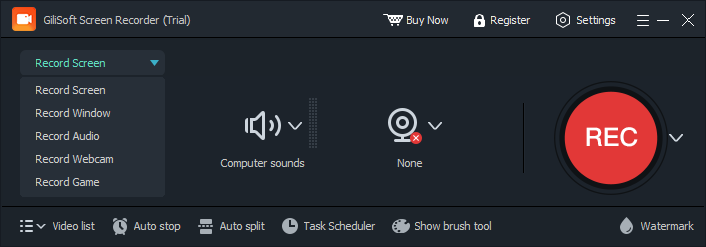
Record the full screen, a selected region, an application window, or another available display target.
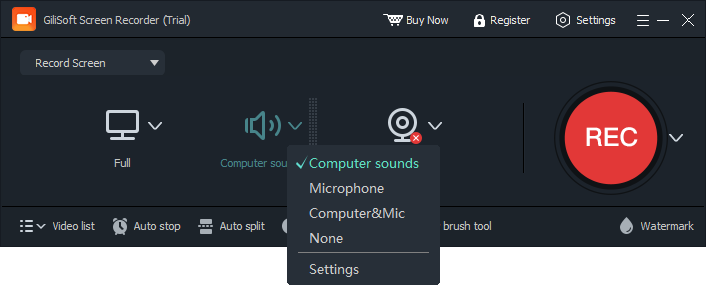
Choose system sound, microphone narration, webcam video, or the combination required for the session.
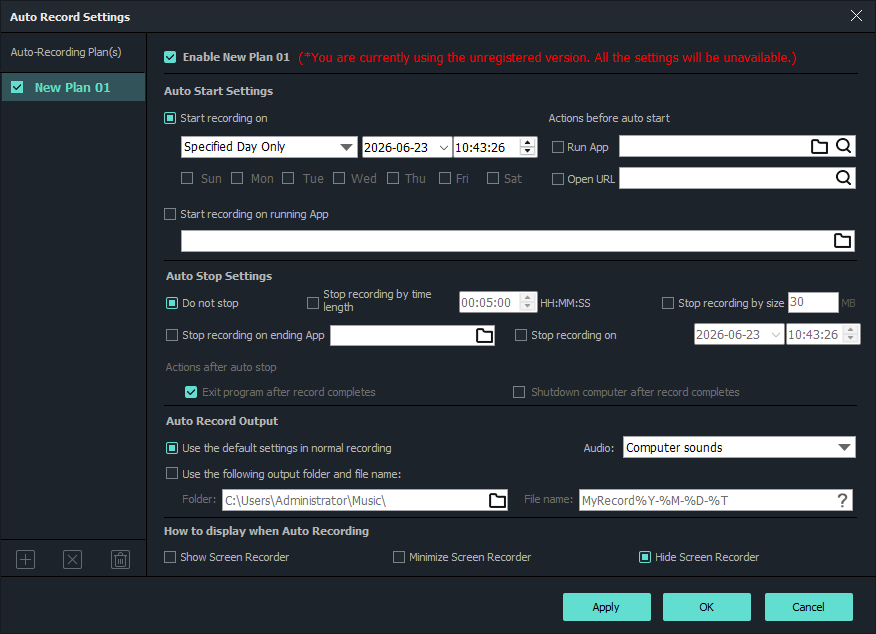
Configure hotkeys, cursor effects, drawing, scheduling, automatic stopping, and file splitting.
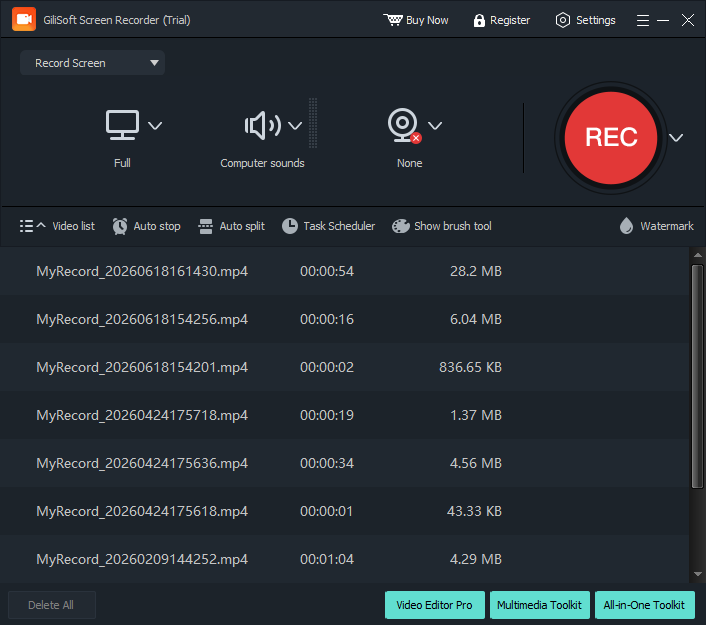
Start capture, take snapshots when needed, then open and manage completed recordings from the output list.
Test screen, audio, webcam, scheduling, and presenter controls with your own recording task.
The core capabilities are grouped by recording stage. The complete feature list remains available below.
Record the full screen, multiple monitors, a selected region, or a single application window. Capture webcam video separately or combine screen and webcam in one synchronized recording.
Use face beauty and skin smoothing for webcam lessons, presentations, reaction videos, and training clips when the presenter needs to look cleaner on camera.
Record computer sound, microphone narration, or both together so voice guidance and on-screen activity stay synchronized.
Remove the webcam background, use a virtual background, or apply green screen matting so presenter videos look cleaner in lessons and demos.
Use hardware-accelerated H.264 encoding to improve recording performance while keeping output quality and file size practical on supported Windows PCs.
Export screen recordings to MP4, AVI, WMV, or FLV for sharing, archiving, editing, uploading, or playback on common Windows media tools.
Draw attention to important areas during capture and add a text or image logo when recordings need visible ownership, branding, or lesson context.
Take desktop screenshots before or during recording and save them as PNG, JPG, or BMP files for documentation and support materials.
Schedule recordings to run once, daily, or weekly for webinars, online classes, meetings, live streams, or recurring desktop capture tasks.
Use countdown, automatic stop, and automatic splitting by time or file size so long recordings stay easier to manage after capture.
Start, pause, resume, and stop recording or capture a screenshot without interrupting the content being recorded.
Show the mouse cursor, click highlights, and optional click sounds so viewers can follow each action more clearly.

Screen and webcam capture stays synchronized through our longer onboarding recordings.
Selected-region capture saves setup time when we prepare short product tutorials and release walkthroughs.
Recording system audio and microphone together removed the need to synchronize narration afterward.
Scheduled recording is dependable for recurring webinars that cannot always be started manually.
Zoom and cursor effects make troubleshooting videos much easier for customers to follow.
GPU-accelerated encoding keeps UI text clear while reducing turnaround time on longer recordings.
Preview the updated recording workflow: choose a capture target, record screen and audio, use webcam beauty and background tools, add watermarks, schedule recording, split long captures, and review the output list.

Start from the main screen to choose recording mode, audio input, webcam overlay, recording settings, and output actions.
Capture slide explanations, software lessons, webcam narration, and voice guidance for online classes and internal training libraries.
Record selected windows or screen regions, emphasize cursor actions, and explain troubleshooting steps with microphone narration.
Keep system sound and microphone input synchronized while recording live sessions for later review, documentation, or sharing.
Set recording start and stop conditions for recurring sessions, timed broadcasts, and unattended desktop capture tasks.
Capture screen activity with system sound, microphone narration, webcam video, or picture-in-picture recording from one Windows tool.
Use cursor effects, click highlights, drawing tools, and zoom while recording to make tutorials and demonstrations clearer.
Prepare recurring or timed captures with scheduled starts, countdown recording, duration limits, and automatic stop conditions.
Use this product for focused screen recording. Choose Screen Recorder Pro when broader post-capture video editing is also required.
Screen recording software vs video editor | View Screen Recorder Pro
Capture software steps and spoken explanations for training, onboarding, customer education, and knowledge-base videos.
Screen recorder for tutorial videos | Record screen with microphone
Add webcam presence to lessons, presentations, demonstrations, and reaction-style recordings while the desktop remains visible.
Record screen and webcam | Screen recorder with webcam and audio
Record recurring or timed sessions with synchronized system audio and microphone commentary for later review.
Record selected areas, zoom into important controls, and show cursor actions for release walkthroughs and troubleshooting guides.
Screen recorder for product demos | Screen recorder for support videos
The complete user guide organizes capture modes, audio, webcam, scheduling, cursor tools, and troubleshooting without crowding this product page.
Yes. Choose system audio, microphone input, or both so narration and computer sound stay synchronized with the screen recording.
Record screen and system audio | Why screen recording has no sound
Yes. It supports screen and webcam recording together for lessons, presentations, tutorials, and picture-in-picture videos.
Record screen and webcam | Screen recorder with webcam and audio
Yes. Scheduled recording, countdown capture, duration limits, and automatic stop conditions help with unattended recording tasks.
Review the selected capture area, audio source, application permissions, display settings, and graphics configuration before recording again.
Why screen recording is not working | Why screen recording is black

 Editors highlighted smooth capture performance for tutorials, meetings, and product demos.
Coverage noted practical presets that reduce setup time before recording.
Gilisoft Screen Recorder is the excellent program in its segment that allows to make
first-class screen video records. It is simple, convenient
and non-resource-intensive software.

Reviewers praised stable audio-video sync in longer sessions and higher resolutions.
Lab notes cited reliable behavior when recording multi-window desktop activity.
Gilisoft Screen Recorder is ideal for recording video conferences or video chats
with your friends and family .

Independent articles described the recorder as production-ready for daily content teams.
Commentary emphasized fast export and low friction from capture to publish.
According to our Senior Editor, Screen Recorder is
the best way to create a video guide, record the game, make a video resume, etc...


Enter your email address to get our latest newsletter